Hugging Face now routes language model requests through OpenRouter, which automatically selects the cheapest or fastest provider. Bring-your-own API keys for language models are going away. According to OpenRouter, the new routing cut capacity errors by 46 percent. Both partners face multibillion-dollar acquisitions. The article Hugging Face now routes model requests through OpenRouter for the best price or speed appeared first on The Decoder.
A Harvard study published in Nature Sustainability found that 403 US hyperscale data centers produced roughly 25.7 million metric tons of CO2 between May 2024 and April 2025, more than all of Denmark. Over half of their electricity came from fossil fuels. With 2,000 additional facilities planned, the researchers warn of a major climate setback. The article More than half the electricity feeding America's largest data centers comes from gas and coal appeared first on The Decoder.
SID AI has released SID-2, its second-generation agentic search model, alongside SID-2 Swarm. SID-2 is an agentic search model from SID AI that searches your data, reads results and returns ranked document IDs. It replaces fixed RAG pipelines with a model that decides what to search next. TL;DR Size: Context window is 262k tokens per the report (256k on sid.ai/models). Runs on: Hosted API at platform.sid.ai, plus Baseten and SageMaker reference paths. SID’s latency figures assume 1 B200 GPU at 8 concurrent queries. Performance: A single agent matches Claude Opus 5.5 on retrieval quality. Swarms beat every model SID tested. Best: SID-2 Swarm (12 agents) scores 0.720 NDCG, above GPT-6 Astra at 0.704. Worst: SID-2 Low scores 0.556 NDCG, 0.148 below GPT-6 Astra. Astra still leads on California law, SEC filings and FiQA. Bottom line: Best: frontier-level retrieval at a fraction of the latency. Worst: no disclosed size, weights or independent evals yet. What is SID-2 and how does it work? SID-2 is a small search specialist, not a general chat model. A static pipeline runs rewrite, embed, search and rerank in a fixed order. SID-2 instead searches, reads results, adapts and searches again. Developers implement the search tools against their own backend. A text_search tool covers keyword search and a search tool covers vector search. The model ends each episode by calling report_helpful_ids with a ranked list. No reindexing or data movement is required, since SID-2 only sees what your tools return. SID-2 Swarm runs several agents that message each other and fork their context into new agents. Each agent explores a separate slice of the corpus. SID argues search gains more from reading more documents than from reasoning harder about each one. What are reasoning effort and Metric Steering? SID-2 offers low, medium and high reasoning effort. Each level was trained as a separate expert, then merged with multi-teacher on-policy distillation. Metric Steering lets users target NDCG, F1 or Recall@k, with k from 1 to 50. On SID’s 506-question validation set, SID-2 at high effort scores 0.14 to 0.22 higher per metric than the base model. How was SID-2 trained? Training used 2-stage reinforcement learning. Stage 1 optimizes retrieval quality only. Stage 2 adds a multiplicative latency penalty that applies only to positive rewards. A proposer-solver self-play loop generated hard queries against a frozen SID-1 solver. SID reports a 6x training-throughput gain over SLIME’s default setup. How does SID-2 perform on benchmarks? SID built a 506-question benchmark across 19 corpora. These include HotpotQA, Enron emails, SEC filings, PubMed and BrowseComp-Plus. All numbers below are self-reported from Tables 2 to 4 of the report. SID-2 Medium: 0.585 NDCG in 3.11 s, versus Claude Opus 5.5 (medium) at 0.577 in 25.1 s. SID-2 Swarm, 6 agents: 0.701 NDCG in 17.7 s, versus GPT-6 Astra (max) at 0.704 in 135 s. SID-2 Swarm, 12 agents: 0.720 NDCG, the highest score in the table. Baselines: BM25 scores 0.260 and vector search plus reranker scores 0.287. Swarm leads on 11 of 19 corpora. On WixQA, a single high-effort agent matches Astra at about 232x lower cost. At its lowest effort, SID-2 beats 4 parallel SID-1 runs with 13x fewer FLOPs. (function(){var f=document.getElementById('mtp-sid2-frame');window.addEventListener('message',function(e){if(e.data&&e.data.type==='mtp-sid2-h'&&e.source===f.contentWindow){f.style.height=e.data.h+'px';}});})(); #mtp-sid2-wrap p:empty,#mtp-sid2-wrap hr,#mtp-sid2-wrap del,#mtp-sid2-wrap s{display:none!important;} SID-2 vs GPT-6 Astra vs Claude Opus 5.5 NDCG, time and cost rows are measured by SID on its own benchmark. Retrieval backend time is excluded. How can developers deploy SID-2? SID-2 is available through SID’s API and on Baseten. SDKs exist for Python (sid-sdk), TypeScript (@sid-ai/sid-sdk) and Go (github.com/sidhq/sid-go). A SageMaker helper covers AWS deployments. The reference implementation uses the OpenAI client format. SID-2 costs $0.25 per million input tokens and $1.00 per million output tokens. Swarm costs $0.50 and $2.00. Cached input is 10% of the input price. Key Takeaways SID-2 is an RL-trained agentic search model that returns ranked document IDs. SID-2 Medium matches Opus 5.5 retrieval at 0.585 NDCG in 3.11 s. 12-agent SID-2 Swarm leads SID’s benchmark at 0.720 NDCG. Pricing starts at $0.25 per million input tokens, with no reindexing. All results are self-reported; size and weights are undisclosed. Check out the SID-2 technical report, the docs and the model page. You can check the deployment options and specs here through our GPULeaderboard.com chrome extension. Also, feel free to follow us on Twitter and don’t forget to join our 150k+ML SubReddit and Subscribe to our Newsletter. Wait! are you on telegram? now you can join us on telegram as well. Need to partner with us for promoting your GitHub Repo OR Hugging Face Page OR Product Release OR Webinar etc.? Connect with us The post SID AI Releases SID-2 Agentic Search Model With 0.720 NDCG Swarm Mode appeared first on MarkTechPost.
Perplexity has added Multiagent to Computer, its agent platform for research and multistep work. Perplexity Computer Multiagent is a new effort level that sits above Ultra. A lead agent runs a team of agents on different frontier models. Those agents work in parallel, share findings directly and check each other’s work. For developers and analysts, the change is structural. Supporting agents no longer report only to a single lead. TL;DR Size: Up to 16 agents per task, plus the lead. Context length: Not disclosed. Runs on: Perplexity’s cloud. Web only, Perplexity Max plan. No local or quantized option. Performance: Not benchmarked. Perplexity published no accuracy or speed numbers. Best: 16-agent cap with direct agent-to-agent checks across 3 default model families (Claude, GPT, Gemini). What is Perplexity Computer Multiagent? Multiagent is the highest effort level in Perplexity Computer. It coordinates AI models to analyze complex tasks and cross-check their work, per Perplexity’s announcement. It builds on effort controls launched on September 17, 2026. That release added 4 settings: Light, Standard, High and Ultra. Each setting picks the orchestrator model and its reasoning depth. Lower settings use less expensive models. How does Multiagent work? The lead agent plans the task and assigns parts to supporting agents. It can assign up to 16 agents and also does part of the work itself. In Perplexity’s example, Claude Fable 5.2 plans the task. It splits work among agents running Claude Opus 5.5, GPT 6.1 Sol and Gemini 4 Carbon. Those 3 models form the default team. Fable 5.2 and GPT 6 Astra join as supporting agents only when requested or needed. Key mechanics from the launch post: Direct sharing: Agents use evidence found by others, question assumptions and flag discrepancies. Shared files: Agents coordinate edits to shared files. One agent can update revenue assumptions and notify another to reuse them in a valuation. Single point of contact: Users talk only to the lead. The lead merges findings into one response. Follow-ups: The lead tells affected agents what changed. The team continues its existing work. Control: Users see which agents and models are running. Stopping the thread stops the whole team. Model choice: Users can name specific models in their query. Multiagent vs Ultra vs Model Council Perplexity now offers 3 ways to put several models on 1 problem: Ultra: One lead delegates to supporting agents. Those agents report only to the lead. Multiagent: The same lead model as Ultra coordinates agents. They talk to each other and edit shared deliverables. Model Council: Several models answer the same question independently. Computer then shows where they agree and disagree. Model Council came to Computer in July 2026. Perplexity positions Multiagent for large, interconnected work that can run in parallel. Its examples include deal data room diligence, multi-scenario forecasts, annual report review, competing-hypothesis research and year-end tax preparation. #mtp-pplx-ma-wrap iframe{width:100%!important;border:0!important;display:block!important;background:#091717!important;border-radius:16px;}#mtp-pplx-ma-wrap hr,#mtp-pplx-ma-wrap p:empty{display:none!important} (function(){var f=document.getElementById('mtp-pplx-ma-frame');window.addEventListener('message',function(e){if(e.data&&e.data.mtpEmbed==='pplx-ma'&&e.source===f.contentWindow){f.style.height=e.data.height+'px';}});})(); How does it compare with other multi-agent products? The clearest difference is model diversity. Perplexity mixes Anthropic, OpenAI and Google models in 1 team. Kimi and Grok run their own model families. Kimi trades depth of debate for scale, with up to 300 sub-agents. Deployment and availability Multiagent is available to all Perplexity Max subscribers. It runs on the web only. Users select Multiagent in Computer’s effort slider when starting a new task. Perplexity’s pricing page lists Max at $167 per month billed annually. Max includes 10,000 Computer credits per month. The launch post does not state credit cost per Multiagent task. Key Takeaways Multiagent is a new Computer effort level above Ultra. A lead runs up to 16 agents that share findings directly. Default team: Claude Opus 5.5, GPT 6.1 Sol and Gemini 4 Carbon. Max-only, web-only, with no published benchmarks. Best fit: data room diligence and multi-scenario forecasting. Check out the official announcement, the effort controls post and Perplexity pricing. You can check the deployment options and specs here through our GPULeaderboard.com chrome extension. Also, feel free to follow us on Twitter and don’t forget to join our 150k+ML SubReddit and Subscribe to our Newsletter. Wait! are you on telegram? now you can join us on telegram as well. Need to partner with us for promoting your GitHub Repo OR Hugging Face Page OR Product Release OR Webinar etc.? Connect with us The post Perplexity Computer Adds Multiagent: Up to 16 AI Agents That Cross-Check Work appeared first on MarkTechPost.
OpenAI has released GPT-6.2 Astra and GPT-6.2 Sol, twp closed models aimed at professional and agentic work. The GPT-6.2 Astra model is the new frontier tier for hard, long-horizon tasks. GPT-6.2 Sol is the efficient everyday tier. For developers, the key point is cost per task. Astra’s token prices fall 20%, and OpenAI says both models finish tasks with fewer output tokens. Both are live in the OpenAI API as gpt-6.2-astra and gpt-6.2-sol. TL;DR Size: 1,050,000-token context window, 922,000 max input, 128,000 max output. Runs on: OpenAI’s hosted API, ChatGPT Work and Codex only. Performance: Astra scores 62 on the Artificial Analysis Intelligence Index, second behind Claude Fable 5.2 (65). Best: Astra ranks #1 on AA-3D with 1,318 Elo, ahead of Fable 5.2 (1,271). Worst: Astra posts a 59% AA-Omniscience hallucination rate (Sol: 55%). Sol’s Coding Agent Index drops 3 points. Bottom line: Best: frontier results at much lower cost per task. Worst: no coding gains, and hallucination stays high. What is GPT-6.2 Astra? GPT-6.2 Astra is OpenAI’s frontier reasoning model for complex professional work. It succeeds GPT-6 Astra. OpenAI says it produces cleaner slides, spreadsheets and documents that follow templates and field conventions. It also builds better frontends, games and 3D scenes. GPT-6.2 Sol replaces GPT-6.1 Sol as the everyday model. How do the two models differ? Both accept text and image input and return text. Both share the same context limits. The split is cost and depth. Astra: knowledge cutoff May 18, 2026. Built for the hardest multistep work. Sol: knowledge cutoff June 1, 2026. Built for fast, versatile everyday tasks. Neither model accepts reasoning effort none. OpenAI recommends keeping prompt prefixes unchanged and appending new instructions. That improves cache reuse and preserves reasoning across turns. What do the benchmarks show? OpenAI’s own claims focus on cost-adjusted gains: Agents’ Last Exam v1.1: Astra scores 5.2 points above GPT-6 Astra at under a third of the cost. It leads Claude Fable 5.2 by 5.5 points at 5% of the cost. Terminal-Bench-Science 0.1: Astra gains 9 points over GPT-6 Astra at under a third of the cost. GDPval v2 (internal): Astra gains 6.2 points with 22% fewer output tokens. Sol gains 5.3 points over GPT-6.1 Sol. FrontierCode 2.0: Sol lands within 0.5 points of Astra at about one-fifth the cost. AA-AnalystAgent: Astra answers 62.5% of questions correctly on all 5 attempts. Independent results from Artificial Analysis mostly hold up. Astra scores 62 at max effort, with a $4.00 cost per Intelligence Index task. Fable 5.2 scores 65, Gemini 4 Carbon 60, Claude Opus 5.5 59 and Sol 57. Sol matches GPT-6 Astra’s score at about 15% of its cost per task. On Harvey LAB-AA, Astra passes 15.0% of legal assignments. The Astra for Law configuration passes 20.8%. Epoch’s Capabilities Index puts Astra at 174, tied with Fable 5.2. window.addEventListener("message",function(e){if(e.data&&e.data.id==="mtp-gpt62"&&e.data.mtpH){var f=document.getElementById("mtp-gpt62-frame");if(f)f.style.height=e.data.mtpH+"px";}}); How much does GPT-6.2 cost in the API? Astra’s input and output prices are 20% below GPT-6 Astra. Cached input is 60% cheaper. Sol keeps GPT-6.1 Sol’s rates. Requests over 272K input tokens double input and cache rates, and output costs 1.5x. Batch is 50% of standard. Ultrafast is 3x standard through February 28, 2027, then 6x. How does it compare with competitors? Index, AA-3D and robotics figures for competitors come from Artificial Analysis as reported by The Decoder. Astra is also OpenAI’s first released model to meet the High threshold for AI self-improvement. Key Takeaways Astra drops to $8/$40 per 1M tokens, 20% below GPT-6 Astra. Astra ranks #2 on the AA Intelligence Index with 62 points. Sol nearly matches Astra on FrontierCode 2.0 at one-fifth the cost. Coding agent scores did not improve, and Sol slipped 3 points. Both models ship with a 1.05M-token context and 128K max output. Check out the OpenAI announcement, the GPT-6.2 Astra model page and the GPT-6.2 Sol model page. You can check the deployment options and specs here through our GPULeaderboard.com chrome extension. Also, feel free to follow us on Twitter and don’t forget to join our 150k+ML SubReddit and Subscribe to our Newsletter. Wait! are you on telegram? now you can join us on telegram as well. Need to partner with us for promoting your GitHub Repo OR Hugging Face Page OR Product Release OR Webinar etc.? Connect with us The post OpenAI Releases GPT-6.2 Astra and Sol With a 20% Cheaper Astra API appeared first on MarkTechPost.
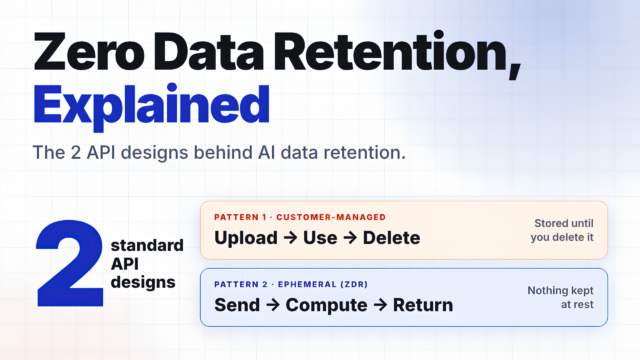
Data retention has become one of the most misunderstood terms in AI infrastructure. After a wave of AI security headlines, many dev teams now ask a simple question. Does my AI provider keep my data? The honest answer depends on how you send it. Send a prompt to an inference API, and it is processed and returned without being kept. That design is called zero data retention (ZDR). Upload a dataset for a batch job, and it stays stored until you delete it. Both are standard designs, and in both the customer is in control. What changes is who manages the data lifecycle, and where. Fireworks AI cofounder and CEO Lin Qiao set out a clear way to think about this. In a November 13, 2026 post on X, she described two standard API designs. Each one decides where control of the data lifecycle sits. The same split has shaped data processing systems for decades. In this article, we will go through that framework with examples from public API documentation. TL;DR The framework: Two standard API designs: upload, use, delete, or send, compute, return. What it is: ZDR is a per-endpoint commitment not to persist covered prompts and outputs after an eligible request. Where it applies: Eligibility depends on the endpoint, request flags and account settings, not the vendor name. Stored features: Batch, file and dataset features keep data until it is deleted or expires. Bottom line: Prefer ephemeral endpoints. If you upload, deletion is your job, so never assume an expiry. What is an AI data retention policy? An AI data retention policy defines what a platform stores from your requests, and for how long. OpenAI’s data controls describe two layers. Application state is data a feature must keep, such as uploaded files. Abuse-monitoring logs are copies held for safety review. A platform can be at zero on one layer and not the other. What are the two common API designs? AI inference and training APIs follow two lifecycle designs. The difference is who manages the data, and where. Pattern 1: Customer-managed retention (upload, use, delete) You create a file or dataset, run jobs against it, then delete it. The platform keeps the data stored and available until you ask for deletion. It cannot know when you are finished unless you define it. So deletion is your job, done through the platform’s APIs. Batch APIs with uploaded datasets are the standard example: OpenAI Batch: upload a JSONL input file, then create the batch. Amazon Bedrock batch inference: input JSONL files sit in an S3 location you choose. Gemini Batch API: jobs run from an input file you provide. Fireworks AI Batch: create a dataset, then submit jobs against it. Once you delete the data, it is gone. According to Fireworks CEO, it keeps nothing after a deletion request. OpenAI non-batch files persist until you delete them. Fireworks AI managed training datasets have no time limit, and the customer deletes them. Amazon Bedrock and Google batch jobs read and write your own cloud storage. OpenAI batch files last 30 days by default, and Anthropic batch data 29 days. Treat expiry as the exception, and confirm it per feature. Pattern 2: Ephemeral processing (send, compute, return) You send data, the platform computes, and the result comes back. No application state stays behind. Your application owns the conversation history, so no platform cleanup step is needed. This is the pattern ZDR applies to. A synchronous response alone does not establish ZDR. Documented examples: OpenAI Chat Completions: store defaults to false. Amazon Bedrock Converse: content is only used to generate the response. Google Gemini text generation: stateless when store is false. Fireworks AI Chat Completions: direct or through Nexus. The schema has no store field. Fireworks AI Training SDK, including Serverless Training: forward_backward sends tokenized batches per call. No dataset is uploaded, and training data is not stored at rest. Think of saving a spreadsheet to a cloud drive versus passing its numbers to a calculator. The drive keeps the file for later. The calculator computes the answer, returns it and keeps nothing. In both designs, customers fully control how their data is handled. What differs is where the lifecycle is managed. In pattern 1, it is explicit dataset creation and deletion. In pattern 2, it lives entirely in your application. Does zero data retention cover every endpoint? The answer is No. ZDR is scoped per endpoint, and defaults differ by platform. OpenAI keeps abuse-monitoring logs for up to 30 days by default. The Amazon Bedrock none mode writes no request or response data to durable storage. Fireworks AI documents ZDR by default for open models. Its ephemeral inference APIs, Training SDK and Nexus carry ZDR guarantees. Prompts and generations are not persisted at rest. For the Batch API, Fireworks document states that no data is retained after deletion. A single parameter can also flip the pattern. On Google’s Interactions API, store defaults to true. At OpenAI, setting store to false is not ZDR, which needs approval. Documentation checked November 15, 2026. Policies change, so confirm against the linked pages. OpenAI and AWS note that content flagged as CSAM can be retained even under zero retention. Why is ephemeral processing the safer default? Every retained copy must be protected, tracked and eventually deleted. Data that never reaches disk cannot be taken from disk later. Regulation points the same way, with one important thing to note. Under GDPR Article 5, ephemeral processing supports storage limitation. Data minimisation still depends on what your application sends. “Ephemeral processing is preferable whenever the workflow allows it.” Lin Qiao, cofounder and CEO, Fireworks AI (post on X) The reasoning is about human error. Ephemeral processing leaves no forgotten datasets and no missed delete calls. It also means fewer retained copies to protect and eventually delete. Stored features still have a place: dataset-based fine-tuning needs data at rest. What should developers check now? Map every endpoint you call to pattern 1 or pattern 2. Default to ephemeral endpoints when you only need the result. For each upload, plan the delete call. Record any documented expiry. OpenAI supports expires_after. Audit flags that persist data, such as store. Keep secrets out of prompts and datasets. Rotate any that slip in. Define ZDR per processing path in contracts. Then verify the setting in your account. Key Takeaways ZDR is an endpoint property, not a vendor label. Stored features keep data until it is deleted or expires. Prefer ephemeral when you only need the result. If you upload, deletion is your job. Never assume an expiry. Further reading: Lin Qiao Post, OpenAI data controls, Amazon Bedrock data retention, Google zero data retention, Anthropic API data retention and Fireworks AI zero data retention. Sources: OpenAI Data controls in the OpenAI platform: Chat Completions reference (create, store default): Batch API guide: Batch API guide, upload your batch input file: Files API reference (create, expires_after): Amazon Bedrock Data retention: Converse API reference: AWS Security Blog, Enforce zero data retention on Amazon Bedrock (July 7, 2026, updated August 13, 2026): Create a batch inference job: Format and upload batch inference data: Model invocation logging: Google Gemini Enterprise Agent Platform and zero data retention (updated November 12, 2026): Abuse monitoring: Batch inference from Cloud Storage: Gemini API, Text generation: Gemini API, Batch API input file: Gemini API, Interactions API overview (data storage and retention): Anthropic API and data retention: How long do you store my organization’s data: Data retention practices for Covered Models: Fireworks AI Zero Data Retention (data handling): Zero Data Retention policy (Enterprise account setting): Secure Training: Chat Completions reference: Training SDK reference, forward_backward: Batch API: Delete Dataset reference: Serverless Training: Prompt caching: Nexus, Data Security and Privacy: Nexus, APIs and SDKs: Security bulletin, Update on October 2026 security incident (Training SDK: training data not stored at rest): Fireworks statement on data retention, “Data retention: the control and standard” (November 13, 2026): Other Regulation (EU) 2016/679 (GDPR): Thanks to the Fireworks team for the thought leadership / resources for this article. This article is sponsored. The post Clearing Up the Confusion on AI Data Retention: Two Standard Designs Explained appeared first on MarkTechPost.
OpenAI releases GPT-6.2 Astra and Sol, two new models that are more capable and cheaper than their predecessors. In the independent Artificial Analysis Intelligence Index, Astra ranks second behind Claude Fable 5.2, and it is the first released model to reach the High threshold for AI self-improvement on OpenAI's own scale. OpenAI itself classifies that as a risk. The article OpenAI launches GPT-6.2 Astra and Sol with lower API prices and some benchmark gains appeared first on The Decoder.
OpenAI wants GPT-6 Astra and GPT-6 Luna to automate administrative tasks in US healthcare through computer-use agents that operate existing clinic software and insurance portals the way a human would. Luna handles tasks like prior authorizations for about 8.5 cents each. Companies including CVS Health and Cigna Healthcare are already deploying the technology. The article AI agents are starting to fill out medical forms and file insurance requests in place of human staff appeared first on The Decoder.
The US is tightening its chip export controls. Data centers in third countries like Singapore and Malaysia will soon need a US license to buy Nvidia chips, closing the loophole that let Chinese firms rent cloud compute abroad. A Reuters investigation also reveals how China offsets its hardware shortage through industrial-scale distillation of US AI models. The article The US wants to block China from renting AI power abroad but China already built a parallel supply chain from US AI output appeared first on The Decoder.